How to Humanize AI Content at Scale: 7 Stages for Agencies

Updated October 4, 2026
The TL;DR
To humanize AI content at scale, standardize the system, not the shortcuts. Give every client a voice profile, lock the facts before any rewriting, humanize in its own stage, run the same QA on every article, and keep a named human accountable for approval. Google's spam policy targets mass-produced pages that add little value to users, no matter how they are created, so volume is never the goal. Repeatable quality is.
What You'll Learn
- Why humanizing one article and humanizing fifty client drafts are different problems
- What belongs in a client-specific humanization profile
- Which facts to lock before any rewriting begins
- A seven-stage workflow with an owner for every stage
- A batch QA checklist, and what to scale versus what never to scale
The Breakdown
Why is humanizing AI content at scale different?
One AI-assisted article can be reviewed line by line. Dozens of drafts across several clients, writers, and deadlines cannot. The challenge is not just volume. It is consistency, and four problems get more likely as volume grows.
| Problem | What happens | The fix |
|---|---|---|
| Clients start sounding the same | Shared prompts and rewrite rules pull every brand toward one neutral style | A separate voice profile per client |
| Facts drift between versions | Prices, features, and claims get shortened, softened, or exaggerated across rewrite rounds | Lock facts before humanization and recheck after |
| Review becomes a bottleneck | One editor reviewing 30 to 50 drafts has less time per piece, so quality varies | One checklist, applied to every article |
| Standards differ by editor | "Humanize this" means tone to one person, SEO to another, and aggressive rewriting to a third | Written stage definitions and owners |
The rest of this guide removes that ambiguity. For the sentence-level method on a single document, start with our guide to how to humanize AI text.
What goes in a client humanization profile?
Build one reusable profile per client before humanizing anything. It can live inside the brand documentation or content brief the agency already uses. It does not need new software.
| Section | What to document |
|---|---|
| Audience and tone | Target reader, level of formality, tone range by format |
| Terminology | Preferred product and feature names, terms the brand avoids, required SEO terms |
| Claims | Approved factual claims, prohibited claims, compliance-sensitive wording |
| CTA rules | Preferred phrasing and the action each campaign is designed around |
| Examples | Approved copy that shows the voice better than "professional but approachable" |
| Known mistakes | Corrections the client has made before |
A SaaS client may want short, direct language with no exaggerated adjectives. A technical buyer brand may need precise terminology even when it makes the writing formal. A third may be conversational but require every claim to match documentation exactly. A generic rewriting prompt cannot infer those differences. Document them first.
What should be locked before humanization?
Split every draft into two categories: information that must stay accurate, and language that can improve. Protected facts are constraints, not suggestions.
Lock product and feature names, prices, dates, statistics and their sources, required claims, URLs, and the CTA's intent. A smoother sentence is not an improvement if it changes the product. A friendlier CTA is not better if the campaign was built around a different action. A reworded heading is not useful if it removes a required topic from the page.
What is a scalable AI humanization workflow for agencies?
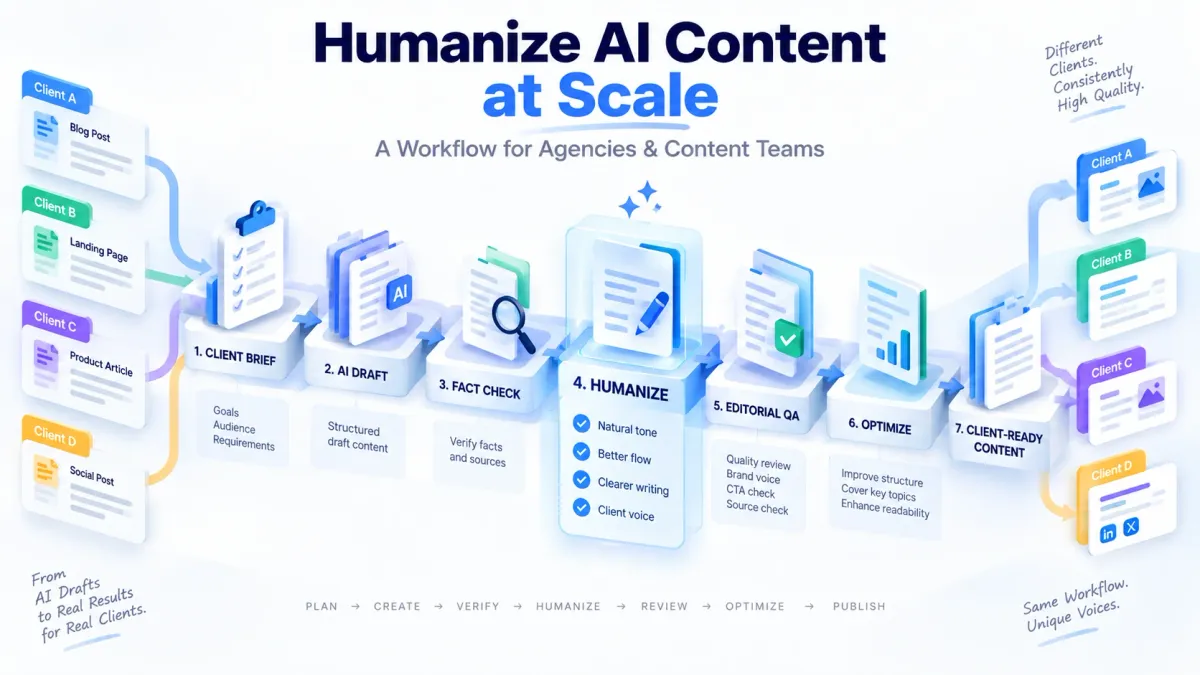
Separate creation, verification, humanization, optimization, and approval into distinct stages. Each stage has one job and one owner.
- Brief. Define the content goal, audience, search intent, format, client voice, key facts, required sources, product terminology, CTA, required claims, and prohibited claims. The brief is the reference every later stage is compared against.
- Draft. Solve the content problem first. The draft should follow the approved structure before anyone polishes sentences. Generation and humanization are separate jobs.
- Fact-check. Verify product names, prices, dates, statistics, citations, URLs, and competitor details before rewriting. A humanizer preserves a wrong claim as faithfully as a right one.
- Humanize. Improve tone, rhythm, sentence variation, and readability without changing meaning. The AI Humanizer is built for this stage. The review question is simple: did the writing improve without changing what the client is saying?
- Editorial QA. Run the same checklist on every article (below).
- Optimize. For search-driven content, check intent, topic coverage, entities, headings, and internal links. This is a different job from humanizing, which is about language quality. The AI Content Optimizer handles this stage.
- Approve. One named person owns the publish decision.
The sequence matters: accurate first, humanized second, optimized third.
Who should own each stage?
Smaller teams will combine roles. The principle matters more than the job title: every stage has someone responsible for its outcome.
| Stage | Typical owner | Done when |
|---|---|---|
| Brief | Account manager or strategist | Facts, voice, and CTA are written down |
| Draft | Writer or AI workflow operator | Draft follows the brief's structure |
| Fact-check | Researcher or editor | Every protected fact is confirmed |
| Humanize | Editor | Meaning is unchanged, language is natural |
| Editorial QA | Senior editor | Checklist passes with no open flags |
| Optimize | SEO lead | Intent and coverage are confirmed |
| Approve | Content manager or client | Publish decision is recorded |
How do you QA humanized content in batches?
Use the same standards for every deliverable. A checklist catches patterns. A human editor catches context. You need both.
| Check | What to look for |
|---|---|
| Meaning | Changed claims, removed qualifications, altered numbers, stronger promises, missing limitations |
| Client voice | Does it sound like this client? Could this paragraph belong to another account? |
| Facts and sources | Names, dates, prices, statistics, quotes, and links all still correct |
| Duplicate phrasing | Repeated intros, transitions, conclusions, and CTA language across the batch |
| CTA consistency | "Start a free trial" has not become "Contact our team" unless intended |
| Search intent | The page still answers the query it was built for |
| Formatting | Heading hierarchy, lists, tables, paragraph length, CTA placement |
| Unsupported claims | Words like guaranteed, always, proven, best, fastest, and safest need evidence |
| Readability | Read it as a normal user would. Does the pacing hold? |
How do you keep different clients from sounding the same?
Voice homogenization is the biggest hidden risk. If every client shares the same prompts, rewrite instructions, transition patterns, and CTA style, the output becomes consistent in the wrong way. Keep four things per client: approved examples, client-specific vocabulary, CTA style, and a tone range by format. A product page may be direct and concise while educational content is more explanatory. Define what changes by format, and review against it. For a deeper look at this problem, see how to humanize AI marketing content without losing brand voice.
How do you scale content without triggering Google's spam policy?
Scale the systems. Do not scale the pages. Google's spam policies describe scaled content abuse as creating many pages primarily to manipulate search rankings rather than help users, no matter how the content is produced, and list generating many pages with AI tools without adding value for users as an example (policy page updated August 28, 2026). Google's separate guidance says using AI is not against its guidelines when the content is helpful (February 2023).
| Scale these | Never scale these |
|---|---|
| Research systems and brief templates | Thin keyword variations |
| Fact-checking and voice guidelines | Near-duplicate pages |
| QA processes and editorial roles | Unreviewed AI drafts |
| Approval workflows | Pages that exist only to target a phrase |
For the full evidence on how Google treats humanized content, see does humanizing get penalized by Google.
What can an AI humanizer not automate for an agency?
It improves the language of a draft. It cannot know what the agency or client knows. It cannot replace client strategy, fact verification, legal or compliance review, undocumented brand preferences, editorial judgment, client approval, subject-matter expertise, or original experience. It also cannot guarantee rankings, traffic, conversions, detector results, or that a page offers unique value. Disclosure is a separate question your clients may care about, covered in whether humanizing AI content is ethical and legal. Treat the tool as one stage, not the process.
How We Judge Whether a Batch Is Ready to Ship
We ask the same three questions of every article in a batch. Can the client's own team tell this was written for them and not for a competitor? Would we stand behind every fact if the client asked for the source? And does the page tell a reader something the next result does not? A batch is ready only when every article clears all three. If even one fails, it goes back to its stage, however polished the sentences are.
Founder Observation
I know what scaled AI content looks like from the receiving end. When I took over HumanizeAI.com, many of the articles on the site had been built with AI and never properly checked. After the March 2026 core update, our daily clicks fell by roughly 78% in about ten days. Fixing it meant removing and rebuilding content, not publishing more of it. That is why I tell agencies that volume was never the asset. A repeatable process that produces fewer, better pages is the asset.
Research & Supporting Evidence
- Google Search Central, "Spam policies for Google web search" (updated August 28, 2026): scaled content abuse covers many pages made primarily to manipulate rankings, however they are produced, including AI-generated pages that add no value for users.
- Google Search Central, "Google Search's guidance about AI-generated content" (February 2023): AI use is not against guidelines. Content is judged on helpfulness and E-E-A-T, and automation used primarily to manipulate rankings violates policy.
Mini Case Study: How a Fact Lock Catches Drift
Illustrative example, not a named client. A SaaS client's brief says the product has a "14-day free trial" and the CTA is "Start your free trial." After a rewrite, a draft reads "Try it free" in the body and "Talk to our team" in the closing CTA. Both edits read smoothly. Neither matches the brief. Because the trial length and the CTA were locked, the QA stage compared the final draft to the brief, flagged both changes, and restored them before approval. Without the lock, the draft would have shipped with a different offer than the one the campaign was built around.
Key Takeaways
- Scale the workflow, not the number of AI-generated pages.
- Keep a separate voice profile, terminology list, and approved examples for every client.
- Lock facts, claims, sources, and CTA intent before humanization begins.
- Humanization is one stage, not the whole editorial process. Optimization is a separate stage.
- Batch QA makes review consistent, but every article still needs page-level judgment.
- Every stage needs a named owner, and one person approves what gets published.
Frequently Asked Questions
How do agencies humanize AI content at scale?
Agencies standardize briefs, client voice profiles, fact checks, rewriting rules, editorial QA, and approval stages. The workflow becomes repeatable while each client's content stays distinct and accurate.
Can you bulk humanize AI content?
You can run many drafts through a repeatable workflow, but check what each tool actually offers. HumanizeAI's pricing page lists API access on its paid plans, while its AI Humanizer page does not describe a bulk-upload feature. Whatever the tooling, every document still needs checks for meaning, client voice, facts, and final quality.
How do agencies preserve client voice when using AI?
Create separate voice guidelines for every client covering tone, vocabulary, product terminology, CTA style, banned phrases, and approved examples. Review the humanized output against those rules instead of relying on one generic prompt for all accounts.
How do you QA AI-assisted content at scale?
Use the same checklist on every article: meaning preservation, factual accuracy, client voice, sources, CTA consistency, search intent, links, formatting, unsupported claims, and readability. A standard checklist makes review consistent without removing article-level judgment.
Does Google penalize scaled AI content?
Google does not penalize content simply for being AI-generated. Its spam policies target scaled content made primarily to manipulate rankings rather than help users, including large numbers of AI-generated pages that add little or no value.
Should every AI-generated article be manually reviewed?
For professional client work, yes. A human reviewer should confirm facts, client positioning, search intent, brand voice, claims, links, and whether the final article is useful.
What is an AI humanization workflow?
It is a repeatable process for improving AI-assisted drafts while protecting meaning and editorial quality. At agency scale it typically includes a brief, a draft, fact verification, humanization, QA, optimization, and approval.
Ready to Build a Workflow Your Clients Can Trust?
Scale the system, not the shortcuts.
Content Studio is launching this month with a Content Creator and Brand Voice module to help drafts start closer to each client's voice, plus a Content Optimizer and the Humanizer for the final polish. Start with the Humanizer on a draft you already have.
Read the full humanization guide
Additional Resources
- How to Humanize AI Text and Make It Sound Natural
- How to Humanize AI Marketing Content Without Losing Brand Voice
- How to Humanize ChatGPT Content
- Does Humanizing Get Penalized by Google?
- AI Article Agent
Teams that need a faster first-draft workflow can use HumanizeAI’s AI Writer before applying the quality-control stages above.
About the Author
Steve Palomares is the founder of HumanizeAI.com, where he builds tools and publishes research on AI writing, AI search visibility, and content quality..