Grammarly vs QuillBot: Which One Is The Best AI Tool?
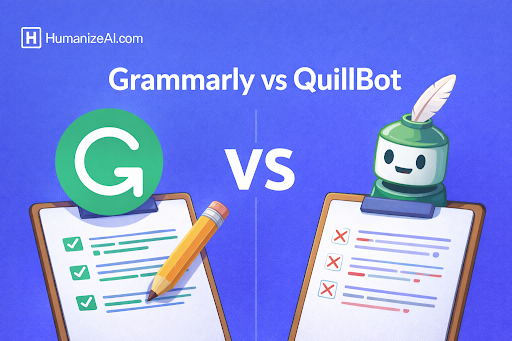
AI-powered writing tools have become essential for students, professionals, marketers, and businesses that rely on clear, accurate, and effective communication. Among the most popular tools in this space are Grammarly and QuillBot. Both promise to improve writing quality, but they do so in very different ways and are built for different user needs.
While many comparisons focus only on surface-level features, the real difference between Grammarly and QuillBot lies in how they assist writers, what problems they solve, and how deeply they integrate into the writing process. Choosing the wrong tool can lead to frustration, inconsistent output, or limited value, especially for long-form content, academic writing, or professional communication.
This guide offers a detailed, experience-driven comparison of Grammarly and QuillBot so you can decide which tool aligns best with your writing goals.
Why the Grammarly vs QuillBot Comparison Matters Today
Writing expectations have changed. Search engines, academic institutions, employers, and readers now demand clarity, originality, tone accuracy, and credibility. At the same time, writers are producing more content than ever across emails, blogs, reports, social media, and research papers.
AI writing tools are no longer optional helpers; they are productivity multipliers. However, not all tools serve the same purpose. Grammarly focuses on writing correctness and professionalism, while QuillBot focuses on rewriting and paraphrasing existing text. Understanding this distinction is critical, especially as AI-generated content detection, plagiarism concerns, and content quality standards become stricter.
What Is Grammarly?
Grammarly is an AI-powered writing assistant designed to help users write clear, correct, and professional content. Its primary role is not to rewrite content but to improve what you already write by identifying grammatical errors, spelling mistakes, punctuation issues, tone inconsistencies, and clarity problems.
Grammarly works in real time and integrates directly into browsers, email clients, word processors, and collaboration tools. This makes it particularly valuable for professionals who write frequently and cannot afford careless errors.
Unlike tools that generate or rephrase content aggressively, Grammarly acts more like an intelligent editor. It highlights issues, explains why something is wrong, and suggests improvements without changing the writer’s original intent unless asked.
Grammarly’s Core Strengths Explained
Grammarly excels at language accuracy and tone control. It understands sentence structure, verb agreement, punctuation rules, and contextual grammar far better than basic spellcheckers. It also evaluates tone, helping writers ensure their message sounds confident, polite, formal, or friendly depending on the context.
Another major strength is consistency. Grammarly is designed to maintain a professional writing standard across all communication channels, whether you are sending a business email, writing a blog post, or preparing an academic document.
For teams and organizations, Grammarly also supports brand tone guidelines and writing consistency, which is crucial for trust and authority.
What Is QuillBot?
QuillBot is an AI-powered paraphrasing and rewriting tool. Its main purpose is to take existing content and rephrase it in different ways while preserving the original meaning. This makes it particularly popular among students, researchers, and writers who need to rewrite content for clarity, originality, or brevity.
Rather than correcting grammar line by line, QuillBot focuses on restructuring sentences, changing vocabulary, and altering phrasing. It offers multiple rewriting modes that adjust the level of creativity, formality, or simplicity.
QuillBot is commonly used for academic paraphrasing, content repurposing, summarization, and rewriting AI-generated text into a more natural or human-like form.
QuillBot’s Core Strengths Explained
QuillBot’s biggest advantage is paraphrasing flexibility. It allows users to rewrite text in multiple styles, which is especially useful when trying to avoid repetition, reduce plagiarism risk, or simplify complex language.
It also includes tools like summarization and grammar checking, but these are secondary features rather than its primary focus. QuillBot works best when the user already has content and wants to transform it rather than polish original writing.
Because of this, QuillBot is often used after drafting, whereas Grammarly is used during and after writing.
Grammarly vs QuillBot: Feature Comparison Table
Grammarly vs QuillBot: Feature-by-Feature Comparison
While pricing is an important factor, the real difference between Grammarly and QuillBot becomes clear when comparing their core writing features. Both tools support writing improvement, but they approach it from very different angles, one focuses on accuracy and professionalism, while the other focuses on rewriting and transformation.
1. Grammar and Language Accuracy
Grammarly is widely recognized for its advanced grammar and language correction capabilities. It analyzes sentence structure, verb agreement, punctuation, and contextual grammar with high precision. The tool also explains why a correction is suggested, which helps users improve their writing skills over time. This makes Grammarly particularly reliable for professional, academic, and business communication where accuracy and credibility are critical.
QuillBot includes a grammar checker, but grammar is not its primary strength. While it can catch common grammatical errors, it lacks the depth and contextual analysis that Grammarly offers. Users relying solely on QuillBot for grammar correction may still need manual review, especially for formal or high-stakes writing.
2. Paraphrasing and Rewriting Capabilities
This is where QuillBot clearly outperforms Grammarly. QuillBot is designed specifically for paraphrasing and sentence restructuring. It allows users to rewrite text using multiple modes, such as more formal, simpler, or more fluent language. These modes help generate alternative versions of the same content while preserving the original meaning.
Grammarly does offer limited sentence rewrites, but these are intended to improve clarity or tone rather than generate multiple variations. Grammarly is best suited for refining original writing, not transforming existing text extensively.
3. Tone Detection and Style Control
Grammarly includes advanced tone detection that evaluates how a piece of writing might sound to a reader. It can identify whether text appears confident, polite, formal, or assertive and suggest adjustments accordingly. This feature is especially useful for emails, client communication, and professional documents where tone matters as much as correctness.
QuillBot does not provide tone analysis. While its paraphrasing modes indirectly affect tone, the tool does not explicitly evaluate emotional intent or reader perception. As a result, users must manually assess whether rewritten content matches the desired tone.
4. Summarization Features
QuillBot offers a dedicated summarizer that can condense long articles, research papers, or reports into key sentences or short paragraphs. This feature is particularly useful for students and researchers who need to extract main ideas quickly or create concise versions of lengthy content.
Grammarly does not include a standalone summarization tool. Its focus remains on improving sentence-level and paragraph-level quality rather than content condensation.
5. Plagiarism Detection
Both tools offer plagiarism checking as part of their paid plans, but their usage differs. Grammarly’s plagiarism checker is widely used in academic and professional environments and compares text against a large database of web pages and academic sources. It is especially useful for formal submissions where originality is critical.
QuillBot also includes a plagiarism checker, but it is more commonly used as a secondary verification tool after paraphrasing. While useful, it is not as comprehensive or widely trusted as Grammarly’s plagiarism detection for academic or professional publishing.
6. Citation and Academic Writing Support
QuillBot provides built-in citation generation in common academic formats such as APA, MLA, and Chicago. This makes it particularly appealing for students and researchers who need quick reference formatting without switching tools.
Grammarly does not include citation generation. Its academic value lies more in grammar accuracy, clarity, and plagiarism detection rather than reference management.
7. AI Content and Detection Tools
QuillBot includes AI content detection features that help users evaluate whether text may appear AI-generated. This is useful for students and content creators who want to refine AI-assisted drafts to sound more natural.
Grammarly does not focus on AI detection. Instead, it emphasizes improving readability, coherence, and tone, which indirectly helps humanize content but without explicit detection tools.
8. Platform Integrations and Accessibility
Grammarly offers extensive integration across platforms, including browser extensions, desktop apps, mobile keyboards, email clients, Google Docs, and Microsoft Word. This wide accessibility makes it ideal for users who write across multiple environments throughout the day.
QuillBot is accessible through its web interface, browser extension, and Google Docs integration. While effective for rewriting tasks, it does not match Grammarly’s ecosystem-level integration.
9. Learning Curve and Ease of Use
Grammarly is designed to work in the background, providing suggestions as users write. Its interface is intuitive and suitable for both beginners and professionals. The learning curve is minimal, and the tool adapts naturally to different writing styles.
QuillBot requires more user decision-making because users must choose paraphrasing modes and review rewritten output carefully. While powerful, it requires a more hands-on approach to ensure meaning and tone remain accurate.
Feature Comparison Summary
Grammarly excels in grammar accuracy, tone analysis, writing clarity, and professional polish. It is best suited for writers who create original content and need reliable editing support.
QuillBot excels in paraphrasing, rewriting, summarization, and academic support tools. It is best suited for transforming existing content, simplifying complex text, or generating alternative versions.
Rather than replacing each other, these tools address different stages of the writing process. Many users achieve the best results by combining both; using QuillBot for restructuring and Grammarly for final refinement and credibility.
Use Cases Where Grammarly Performs Better
Grammarly is ideal for:
- Business emails and corporate communication
- Blog writing and editorial content
- Academic writing that requires precision
- Professional documentation
- Team collaboration and brand consistency
It is especially valuable when writing from scratch and refining ideas into polished final content.
Use Cases Where QuillBot Performs Better
QuillBot is ideal for:
- Paraphrasing academic content
- Rewriting existing articles
- Summarizing long documents
- Simplifying complex text
- Reworking AI-generated drafts
It works best when the writing already exists and needs transformation rather than correction.
Pricing and Accessibility Comparison
- Grammarly generally costs more, especially for premium features, but the value justifies the price for professionals and teams who rely on writing daily.
- QuillBot is more affordable and attractive for students and individual users who primarily need paraphrasing and summarization tools.
The pricing difference reflects their purpose: Grammarly is a professional writing assistant, while QuillBot is a rewriting utility.
Grammarly vs QuillBot: Pricing Comparison (USD)
Grammarly is priced higher because it functions as a full writing quality and tone assistant, making it suitable for professional and business environments. QuillBot is more affordable and optimized for paraphrasing and rewriting, which makes it popular among students and individual creators.
Can Grammarly and QuillBot Be Used Together?
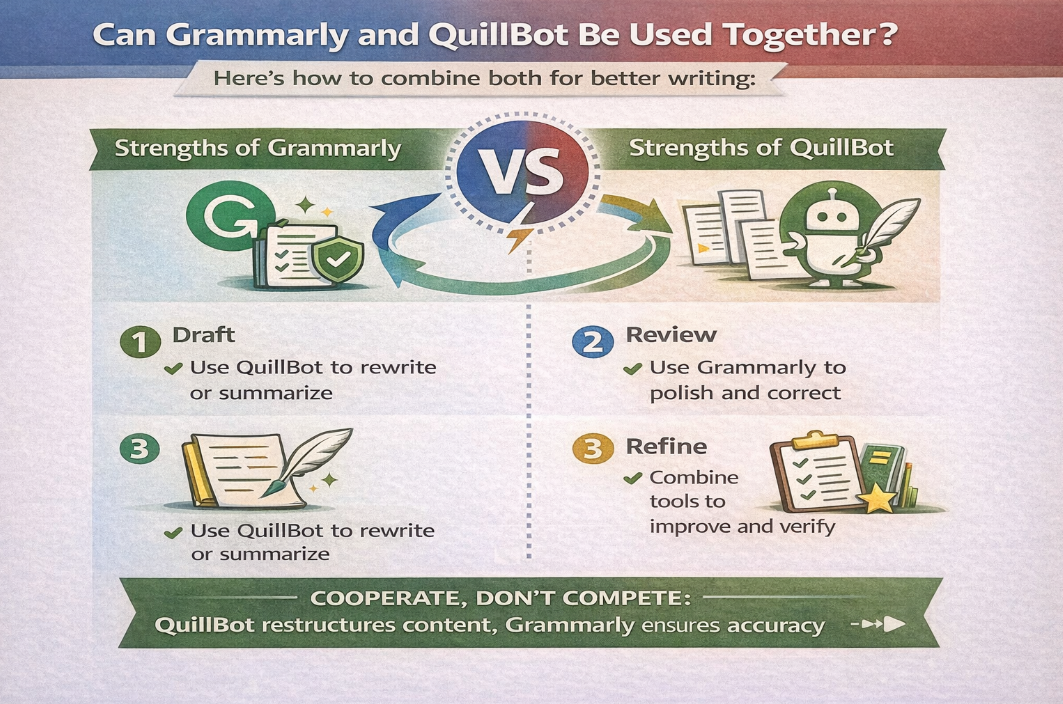
Yes, and many writers do exactly that.
A common workflow is:
- Draft or rewrite content using QuillBot when needed.
- Polish and finalize the content using Grammarly.
Used together responsibly, they complement each other rather than compete.
Final Verdict: Grammarly vs QuillBot
Grammarly and QuillBot are not direct competitors in the traditional sense. They solve different problems at different stages of the writing process.
Grammarly is best for writers who care about accuracy, tone, clarity, and professionalism. QuillBot is best for writers who need rewriting, paraphrasing, and content variation.
If your goal is high-quality, trustworthy, and polished writing, Grammarly should be your primary tool. If your goal is to transform or repurpose existing content, QuillBot is a valuable addition.
The smartest choice is not to pick one blindly, but to understand when and how to use each tool to support human creativity rather than replace it.
Frequently Asked Questions
1. Is Grammarly better than QuillBot?
Grammarly is better for editing and correctness, while QuillBot is better for paraphrasing. The better tool depends on your writing goal.
2. Can QuillBot replace Grammarly?
No. QuillBot does not offer the same depth of grammar, tone, and clarity analysis as Grammarly.
3. Is Grammarly good for SEO writing?
Yes. Grammarly improves readability and clarity, which supports better user experience and content quality.
4. Does QuillBot help avoid plagiarism?
QuillBot can help rewrite text, but plagiarism avoidance still requires proper citations and human review.
5. Should students use Grammarly or QuillBot?
Students often benefit from using both, Grammarly for correctness and QuillBot for paraphrasing and summarization.