





Humanize AI Text — Free AI Humanizer
HumanizeAI is an AI humanizer and AI-to-human text converter that helps turn AI-generated writing into clearer, more natural, human-like text. Paste your content, humanize it in seconds, and review the result for tone, readability, and meaning before publishing or submitting.
Use the tool to humanize AI text, improve readability, and make your writing sound more natural. Always review the final output to ensure it matches your intended meaning and context.
What Is an AI Humanizer?
An AI humanizer is a tool that rewrites AI-generated text to make it sound more natural, clear, and readable. It helps reduce robotic phrasing, improve sentence flow, and adjust tone while keeping the original meaning of the content. HumanizeAI is designed for users who want to improve AI-assisted writing before publishing, submitting, or sharing it.
What Is an AI-to-Human Text Converter?
An AI-to-human text converter transforms AI-written content into writing that feels more natural to readers. It does not simply replace words; it improves clarity, flow, sentence rhythm, and tone so the text sounds less robotic and more human. This makes it useful for blog drafts, emails, essays, marketing copy, product descriptions, and other AI-assisted writing.
Works With Text From Any AI Writing Tool
HumanizeAI can be used on text generated by ChatGPT, Gemini, Copilot, Claude, and other AI writing tools. Paste content from any source and humanize it the same way, regardless of which AI model produced the original draft.
Why Choose Humanize AI?
Natural Writing Quality
Improve robotic or repetitive AI phrasing and make your content sound clearer, smoother, and more natural to human readers.
Make AI Text Sound More Human
Refine AI-generated text so it feels more natural, engaging, and aligned with your intended voice.
Save Time Without Sacrificing Quality
Humanize drafts faster while still reviewing the final output for accuracy, context, and meaning.
Perfect for Any Use Case
Use HumanizeAI for blog drafts, emails, essays, study notes, marketing copy, product descriptions, and professional writing.
Improve Readability and Engagement
Make sentences easier to read, improve flow, and reduce awkward or repetitive wording.
SEO-Friendly, Without Overdoing It
Improve clarity and readability for SEO content while keeping the writing natural and useful for readers.
The humanizer is part of the Humanizer Suite, with the AI Detector, Plagiarism Checker, Grammar Checker and Paraphraser. Writing full articles for your website? See Content Studio.
Who Benefits from Humanize AI?
Non-Native English Speakers
Improve the fluency, clarity, and readability of your professional writing while keeping your original meaning and voice intact.
Researchers
Refine research papers and academic articles with our advanced AI humanizer, turning complex text into reader-friendly Humanize AI Text
Content Creators
Whether you're a blogger, social media manager, or marketer, Humanize AI makes your content flow naturally and resonate with your audience
Marketers
Create high-quality marketing articles, brand blogs, and product stories that sound natural, persuasive, and authentically human, ideal for SEO-driven content strategies.
SEO Professionals
Produce optimized, human-sounding SEO articles that rank better while maintaining authenticity and audience engagement.
HR Professionals
Humanize internal communications, job postings, and employee-facing content so it sounds like it came from a person.
Legal Professionals
Turn AI-drafted summaries and client-facing text into clearer, more natural language.
Podcasters & Video Creators
Give AI-assisted scripts a more natural, conversational tone before recording.
Success Stories & Testimonials
Know what marketers, writers, students, doctors, and professionals are saying about Humanize AI.
Vijay Singh Katri
SEO Consultant
“Churning out 2,000-word articles every week used to leave me sounding robotic and repetitive. Humanize AI’s long-form paraphrasing retains my unique voice while restructuring complex sections. So I meet deadlines sounding sharp and fresh every time.”
Dr. Daniel Kim
PhD Candidate at the University of Austin
"Integrating Humanize AI’s AI-detector into my workflow has been a game-changer. I can seamlessly paraphrase literature reviews and then instantly verify that every paragraph is free of AI-generated traces—total peace of mind on originality."
Eva Williams
Writer & Gear Reviewer at Fixthephoto.com
“HumanizeAI screens pasted or uploaded text, highlighting literal matches and recastings to ensure rewritten or AI-generated content won’t trigger plagiarism warnings. Fast results with clear source lists and the option to skip trusted domains.” ...Read more
Humanize AI vs Other Tools
Choosing the right AI humanizing tool can make all the difference in creating natural, human-sounding content. Below is a comparison of Humanize AI,Undetectable AI, and other common AI humanizers — focusing on their capabilities, human-like tone, and pricing.
| Feature / Aspect | Humanize AI | Undetectable AI | Other Tools (Typical) |
|---|---|---|---|
| Primary Use Case | Transforms AI-generated text into polished, human-voiced content that sounds natural and professionally written. | Detects and rewrites AI content, with limited tone refinement. | General paraphrasers or rewriters; may lack full humanizing ability or produce natural-sounding results. |
| Humanizing Quality | Advanced algorithms ensure authentic tone, natural flow, and emotional resonance. | Focuses on lowering AI-detection scores; tone often remains slightly mechanical. | Often rephrase text without improving flow or personality; less effective for human tone. |
| Pricing (Entry / Standard) | More affordable – starts at $12/month for high word limits and bundled tools. | Starts around $19/month for fewer words. | Usually $20–$40/month for limited features. |
| Human Writing Quality | High, specifically engineered to produce natural, engaging content that reads like a human wrote it. | Moderate to High — strong focus on AI detection avoidance, may alter content meaning. | Low to Moderate — results vary; output often still reads as machine-written. |
| Additional Core Features | Integrated tools: humanizer + plagiarism checker + SEO/AEO optimized content creator + grammar checker. | Detection + humanizer + multi-detector compatibility + rewriting options. | Paraphrasing, rewriting, grammar fixes — but may not include detector or full humanizing features. |
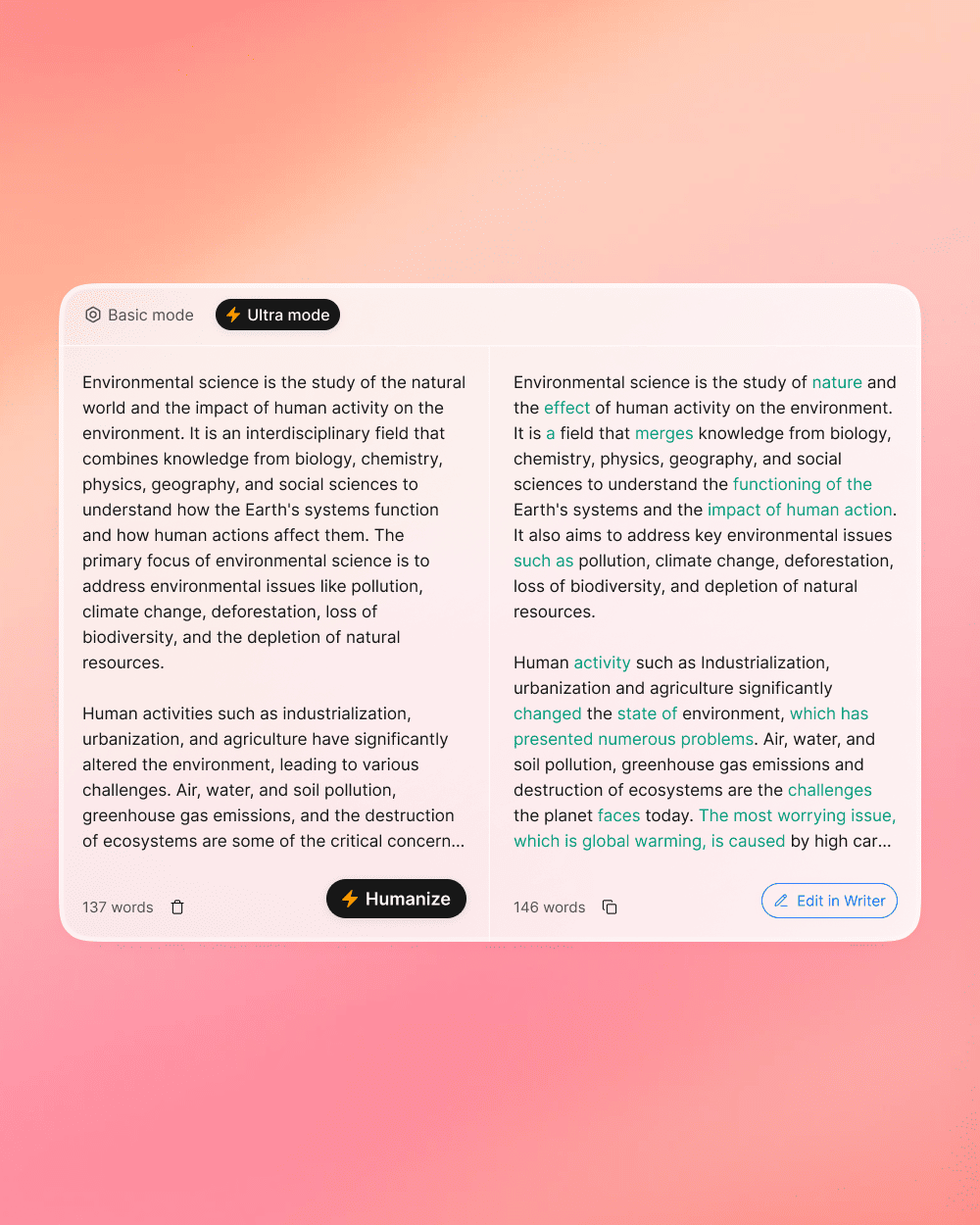
| Ease of Use | 1-Click Humanization; side-by-side comparison view for original vs humanized. | Simple interface; includes multi-detector scan and rewriting tools. | Basic text boxes with minimal processing options; less output control. |
| Best For | Content marketers, freelance writers, and agencies needing natural, human-voiced content at scale. | Users focused mainly on lowering AI-detection scores for academic or professional work. | Occasional users needing simple rewrites or basic paraphrasing. |
AI Humanizer vs Paraphrasing Tool: What's the Difference?
An AI humanizer and a paraphrasing tool can both rewrite text, but they're not exactly the same. A paraphrasing tool mainly changes sentence wording, while an AI humanizer focuses on making AI-generated writing sound more natural, readable, and human-like.
| Tool Type | Main Purpose | Best For |
|---|---|---|
| AI Humanizer | Makes AI-written text sound more natural | AI-generated drafts |
| Paraphrasing Tool | Rewrites sentences in different wording | Sentence-level rewriting |
| Grammar Checker | Fixes grammar and clarity issues | Final proofreading |
| AI Detector | Reviews possible AI-like patterns | Content review |
You can also try our paraphrasing tool or our grammar checker.
How Humanize AI Text Works?
Using Humanize AI is simple and effective. Follow these steps to humanize your text in seconds.
Step 1: Paste Your AI-Generated Text
Copy and paste your AI-generated content into the input box. This can be a paragraph, article section, email, essay draft, social media post, or marketing copy.
Step 2: Click "Humanize"
Run the humanizer to improve the wording, sentence flow, and readability.
Step 3: Review the Humanized Output
Compare the original and humanized text, then review names, facts, citations, formatting, tone, and meaning before using the final version.
Step 4: Copy and Use Your Humanized Text
Once the output matches your intent, copy the humanized text and use it for publishing, submitting, editing, or sharing.
Does HumanizeAI Keep the Original Meaning?
HumanizeAI is designed to improve wording, tone, and readability while preserving the core meaning of the original text. However, users should always review the final output to make sure names, facts, citations, formatting, and context remain accurate. This is especially important for academic writing, professional documents, technical content, and any text that includes specific claims or references.
Ready to Make Your AI Writing Sound Human?
Transform AI-generated text into natural, compelling content that engages your audience. Start free at HumanizeAI.com, start creating authentic and engaging content today!
FAQ
What is HumanizeAI?
How does Humanize AI work?
Does HumanizeAI produce natural, human-sounding content?
How fast can I humanize AI text?
Can I use Humanize AI for academic writing?
Is my content safe and private with Humanize AI?
Is Humanize AI free to use, or do I need a subscription?
Do I need to sign up or register to use the Humanize AI tool?
What is the length or usage limit for the free version?
Does Humanize AI support multiple languages?
Do you offer refunds?
How do I request a refund?
What is an AI humanizer?
What is an AI-to-human text converter?
Will the AI humanizer change the meaning of my text?
Is an AI humanizer the same as a paraphrasing tool?
Can AI detectors still flag humanized text?
Can HumanizeAI preserve formatting or citations?
Does HumanizeAI work on mobile?
AI detectors can be imperfect and their results shouldn't replace human judgment. See our Acceptable Use Policy and Responsible Use approach for how we think about this.